Team Members
Quarterback works best when everyone who needs market intelligence can see it — the IR lead, the CEO, the company secretary, external advisors. The account owner can invite and remove team members directly in the app, without contacting support.
How Team Access Works
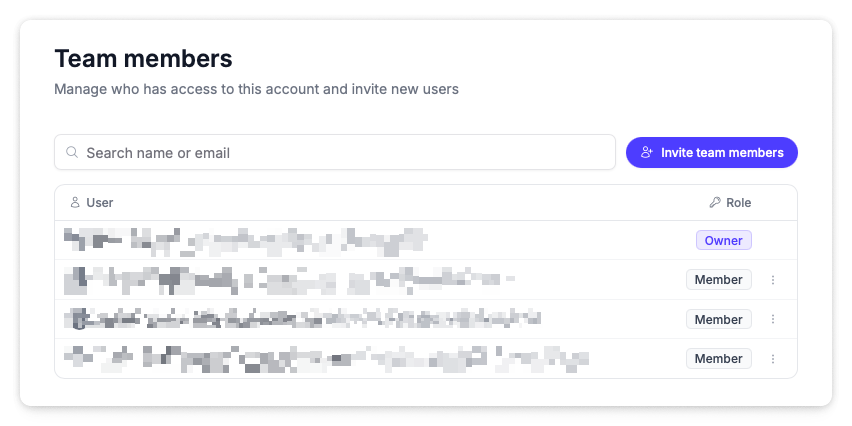
Everyone you add joins your organisation's workspace and sees the same organisation data — activities, announcements, reports, and settings. Every team member gets the full picture.
Each person's role is shown in the team list:
| Role | What it means |
|---|---|
| Owner | The account holder. The only person who can invite and remove team members. |
| Member | Full access to all organisation data — activities, announcements, reports, and settings. |
If you don't see the invite or remove options on the Team Members page, ask your account owner to make the change.
While organisation data is shared, individual preferences are not. Flagged authors, archived activities, and personal alert settings are scoped to each user.
Adding a Team Member
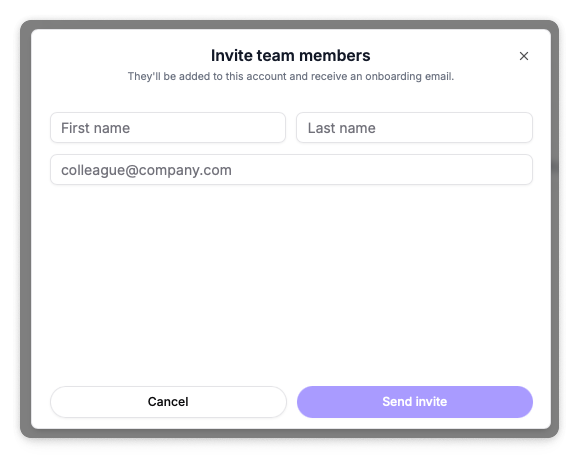
Navigate to Settings → Team Members.
- Click Invite team members.
- Fill in their first name, last name, and email address.
- Click Send invite.
The new team member receives an onboarding email with instructions on logging into their account.
Add anyone who regularly asks "what's happening with our share price?" — a daily glance at the dashboard often replaces the ad-hoc email chain.
Removing a Team Member
Navigate to Settings → Team Members.
- Find the person in the team list — you can search by name or email.
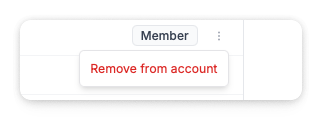
- Click the three-dot menu next to their name.
- Select Remove from account.
Their access ends immediately. Organisation data is unaffected — activities they added and reports they generated remain available to the rest of the team.
Troubleshooting
| Issue | What to check |
|---|---|
| No Add or Remove options visible | Only the account owner can manage team members. Ask your account owner to make the change. |
| Invite email not received | Ask the person to check their spam or junk folder. If it hasn't arrived, remove them from the account and send a fresh invite. |
| Wrong email address entered | Remove them from the account and invite them again with the correct address. |
| Need to transfer ownership or change billing contact | Contact support@qback.au — billing changes are still handled by our team. |